
Filling the schedule
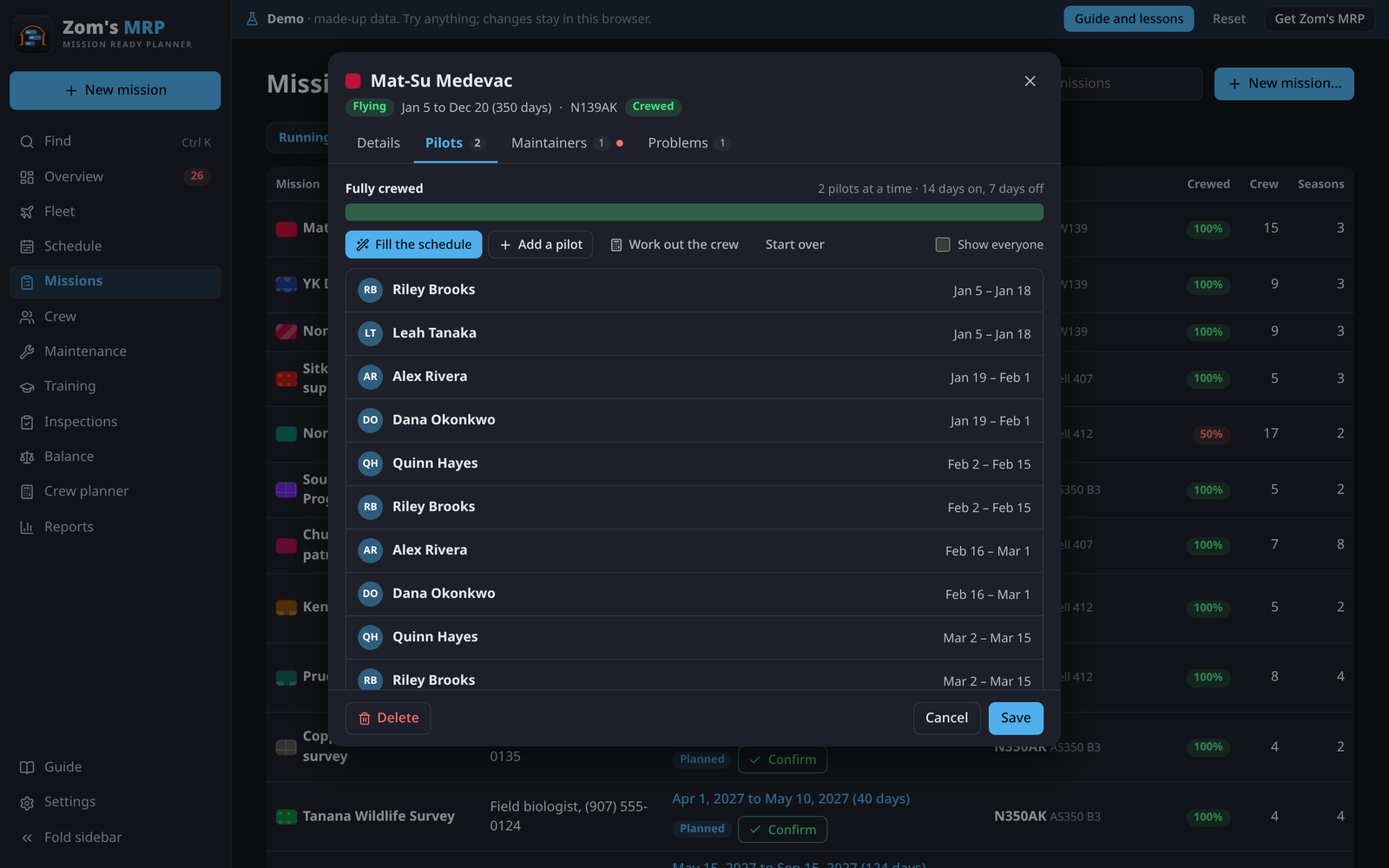
Fill the schedule puts people on a season's open days in one go, on its rotation. Open any season's Pilots tab to follow along.
Rotations
Each season has a Pilot rotation and a Maintainer rotation, like 14 on, 7 off. They can differ. Fill puts people on in stretches of the "on" days, and keeps each person off for the "off" days after. With no rotation, it uses the hitch rules (most days on, fewest days off).
With two or more at a time, Fill staggers the hitches: someone's first hitch is shorter, so the crew don't all need their days off at once. That's how 2 at a time on 21 on, 7 off is covered by 3 people.
How many people a rotation takes
The Pilots and Maintainers tabs, and the rotations on Job requirements, say how many people the job takes at least, and how many are rated and qualified. Each person can work at most the "on" days in every "on" plus "off" days, so:
| At a time | Rotation | Takes at least |
|---|---|---|
| 1 | 21 on, 7 off | 2 |
| 2 | 21 on, 7 off | 3 |
| 1 | 14 on, 14 off | 2 |
| 2 | 14 on, 7 off | 3 |
| 1 | 7 on, 14 off | 3 |
A job no longer than one hitch takes only the people at a time. For flight-hour limits, travel days and duty days, use the Crew planner.
New seasons start with in Settings > Preferences sets the crew sizes and rotation of a mission's first season. Later seasons start from the one before.
Who it picks
Fill only picks someone who is:
- rated on one of the season's aircraft types,
- current on the type, and on the mission's training for the whole stretch,
- not booked elsewhere and not on time off,
- on their own rotation, if they have one,
- inside every work limit: days on, days off and flight hours.
The mission's own crew go first, then whoever has worked least. Someone whose time off is only a preference is picked last. Days nobody can cover stay open, so you see them.
The buttons
| Button | Does |
|---|---|
| Fill the schedule | Fills open days and keeps the shifts already there |
| Start over | Clears that role's shifts and fills again |
| Add a pilot / Add a maintainer | One hitch by hand, from the first open day (tap an open seat to start there) |
| Work out the crew | Opens the Crew planner for this season (save first) |
| Show everyone | Lists people Fill wouldn't pick, with why |
Tap a shift to change the person or the days. The list says who isn't rated, current or free.
Crewing from the mission's own people
- Open the mission and, on Crew, tick the pilots and maintainers who work it.
- On Rotations, press Fill from the crew for a season. It uses only those people.
- Where an open seat is left, press Sub in someone else…. It proposes people from outside the crew who can legally cover it, and books them in one tap, marked Sub.
Swapping one person for another
- Open the season, go to Pilots and tap the shift.
- Pick the other person. Change the days too if only part of the shift moves.
- Press Done, then Save.
Related
- Work limits: the rules Fill keeps to.
- Crew planner: how many people a season takes.
- Balance: filling and rebalancing many jobs at once.
- Schedule: moving shifts by dragging.