
Downloads
The Downloads page is the list of files coming in, in the order they'll download.
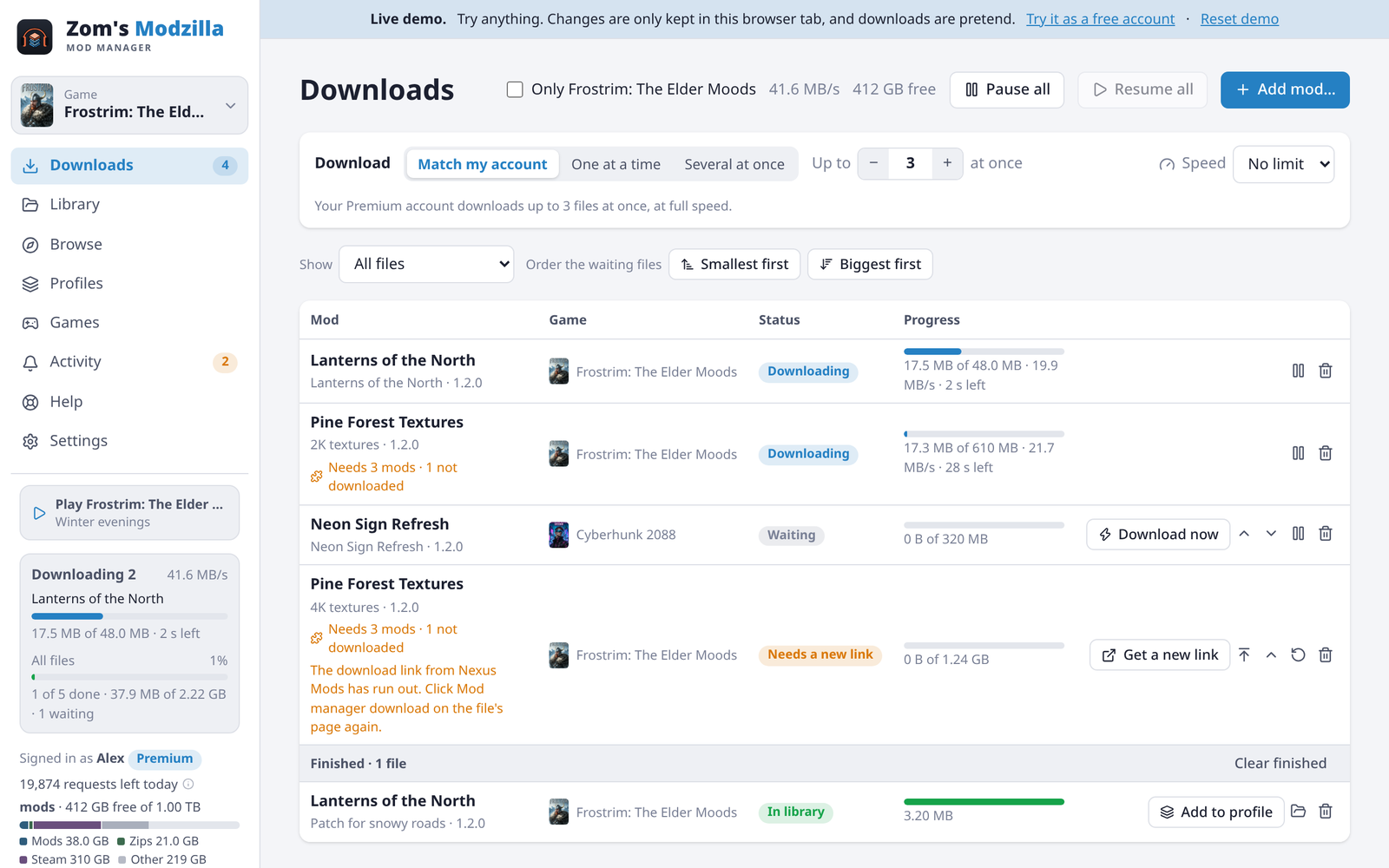
Adding files
- Mod manager download on nexusmods.com (once the website's buttons open the app, see Connecting Nexus Mods).
- Get in Browse, or on a mod the conflict check says is missing.
- Add mod… (or press
N): paste a mod page's address. Premium accounts pick the files there; free accounts are sent to the file's page to click Slow download. - A collection: every file it lists.
- From your phone, with Send from your phone.
Files you already have aren't downloaded again.
One at a time or several at once
Settings › Downloads › How files download:
| Match my account | Several at once with Premium, one at a time with a free account. The usual choice. |
| One at a time | In list order, each one finished, stored and unpacked before the next starts. |
| Several at once | Up to Downloads at once (1 to 8). A long list finishes sooner. |
The change takes effect straight away: files already going carry on, and the next ones follow the new setting.
While they download
- Pause and Resume one file, or all of them. A paused or interrupted file picks up from where it stopped, even after closing the app or restarting the computer.
- Download now starts a file straight away. The one in its place steps aside and carries on after.
- Move to the top puts a file next in line, and the waiting files can be sorted smallest or biggest first.
- Clear finished tidies the list. Finished files stay in your library.
The sidebar shows what's downloading, how fast, and how much of the whole list is done.
When a download fails
With Try again by itself on, a dropped connection is tried again up to 3 times, carrying on from where it stopped. Keep trying later adds tries after 5 minutes, 30 minutes and 2 hours. A failed file says why, with Try again.
A free account's link runs out after a while: if one does before it starts, the file waits with Open page so you can click the website's button again.
After sleep (a closed laptop lid, a Steam Deck's power button), downloads start again on waking, from where they stopped.
Speed and timing
All in Settings › Downloads:
| Setting | Does |
|---|---|
| Speed limit | The most all downloads together may use, so games, streams and calls stay smooth. |
| Download hours | Only start downloads between these hours (ones already going finish). |
| Another speed limit for some hours | A lower limit in the evening, say, when others at home use the connection. |
| While a game is running | Carry on, Hold new downloads until it closes, or Pause downloads. Only games started from Zom's Modzilla are noticed. |
| On battery | On a laptop or Steam Deck, new downloads wait below this charge until you plug in. |
| Unpack on the charger | On battery, finished downloads stay packed until a profile needs them. |
Room on the drive
Before a file starts, the app checks the drive has room for it (and for unpacking it). If it doesn't, the file stops with how much it needs and how much is free.
Closing the window
Closing the window while files are downloading keeps them going in the system tray (needs a tray, see Optional extras). Start with my computer opens the app in the background when you sign in, to finish unfinished downloads, and closes it again if there's nothing to do. Unfinished downloads at start decides whether they carry on by themselves or wait for you.
Checking files
Check downloads compares each finished file with Nexus Mods' copy, to catch a damaged download. It costs one request per file.